
Tarrant County Court Calendars Explained
No single Tarrant County calendar controls every court. Each system keeps its own. District civil courts post separate hearing and trial dockets. Criminal district and county criminal settings appear through DCSA and court-specific sources. County Courts at Law, probate courts, and many JP matters route through Odyssey. Municipal dates stay with the issuing city.
A calendar is a scheduling record. It can show the court, date, courtroom, setting type, and staff contact, but a later reset or order may supersede it. The county's civil docket hub states that coordinators update district civil dockets, not the District Clerk. Current criminal and civil setting entry points sit in the DCSA portal.
Always note the source and its update time. Static court pages, weekly city lists, and live portal results refresh on different rhythms, so a date copied without its court or source can be hard to verify.
Tarrant Court Date Source Map
The paper that started the matter usually names the right calendar. “District Court” points to a district source. “County Criminal Court” or “County Court at Law” points to County Clerk systems, and a precinct number signals a JP court. A city citation belongs to that named municipal court.
| Setting | First source | Confirmation |
|---|---|---|
| District civil | Court-specific hearing or trial docket | Individual coordinator |
| Felony criminal | DCSA Criminal Docket | District criminal court coordinator |
| County misdemeanor | Odyssey or electronic docket | County criminal court |
| CCL, probate, or JP | Odyssey location and calendar | Assigned clerk or court |
| Municipal | Issuing city calendar | Municipal clerk |
The statewide re:SearchTX portal includes a Hearings search. Tarrant’s County Clerk, though, reports a temporary local deactivation. Rely on the local calendar first, and treat statewide data as a secondary check where it works.
Finding Your Tarrant Court Date
Use every channel when the date matters soon. The online record is fast, but a phone call or counter visit can resolve a portal delay or an unclear reset.
- Read the notice for the case number, court, and court level.
- Open DCSA, the court-specific civil page, Odyssey, or the issuing city’s calendar.
- Search by case or citation number before using a name.
- Record the setting date, time, courtroom, setting type, and update stamp.
- Check later docket entries for a reset, continuance, pass, or disposition.
- Call the clerk or coordinator, or visit the public counter, when the date is urgent.
A mailed notice or order may hold instructions a short portal result leaves out. Daily printed calendars at the courthouse help on site. Match them to the case and the assigned room. Phone confirmation works best when the date is close.
Tarrant Civil Coordinators Control Calendars
Each Tarrant civil district court can publish its own hearing and trial docket with “current” and “next” links. The coordinator controls the updates. The District Clerk keeps the case file, but the county names the coordinator, not the clerk, as the source for last-minute civil calendar changes. That warning appears on the official civil docket page.
The fallback is simple. Identify the assigned court from the case record, then use the coordinator listed for that court. Do not ask another district court to interpret the setting.
Fastest civil check: Match the case number to its district court, review that court’s calendar, and call its coordinator for an urgent change.
How to Read a Court Setting
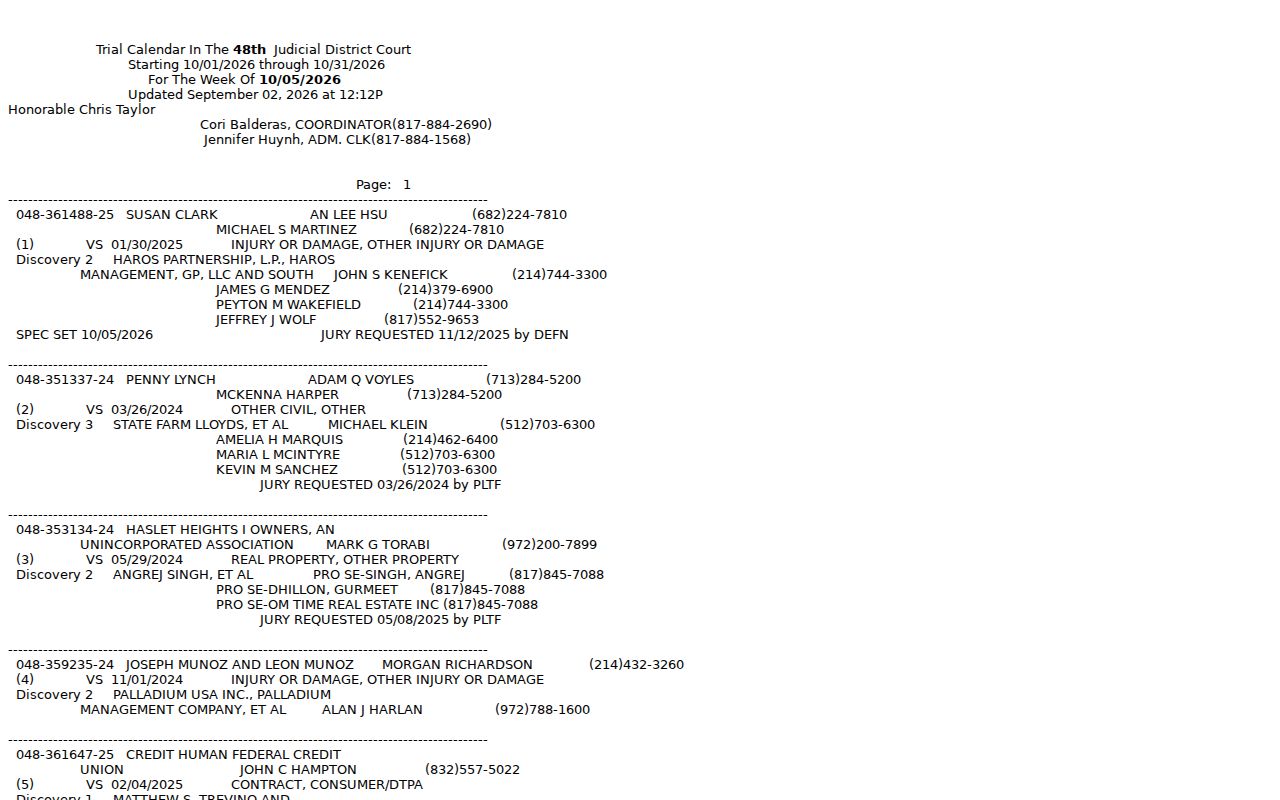
A Tarrant County court date only makes sense with its surrounding fields. The sample 48th District Court calendar offers a useful local inventory without any private case example.
| Date and time | When the event is scheduled; confirm whether a time block or exact time is shown. |
|---|---|
| Court and courtroom | The assigned judicial office and physical or virtual location. |
| Setting type | Hearing, discovery, pretrial, plea, trial, sentencing, or another event. |
| Setting count | The first or later setting count; it does not explain why an earlier date changed. |
| Judge | The judge shown for the calendar, subject to assignment changes. |
| Coordinator | The court staff contact for scheduling information. |
| Update stamp | The date or time the calendar source was last refreshed. |
A “jury requested” field records a demand or status, not a chosen jury. “Non-jury” means a bench setting, and “discovery” is a scheduling event rather than a decision on liability.
Tarrant Trial Calendar Vocabulary
The 48th District Court trial list groups settings by date or week. It lists cause numbers, captions, and case classifications. Setting counts and setting types round it out. Jury or non-jury status, judge, coordinator, administrative clerk, and public phone are included too. Categories such as contract or debt, other civil, and injury or damage involving a motor vehicle may appear too. The official trial calendar shows each field.
A calendar is not a case file. It shows when and where a matter is set. It does not give you every motion, order, or reason behind a reset.
- Hearing docket
- Cases scheduled for a hearing date or block.
- Trial docket
- Cases assigned to a trial period, often with jury status.
- Pass
- A setting removed or not reached as planned; confirm what follows.
- Continuance
- A movement of the event to a later date by order or court action.
Tarrant Continuances, Resets, and Cancellations
A reset changes the scheduled date. A continuance generally postpones the event. A pass, a nonsuit, a disposition, or a later scheduling order can also decide whether an older listing is still active. The short calendar label may not say who asked for the change or why.
Read the docket in time order. Compare the displayed “next setting” with later orders and notices. For a civil matter, call the assigned coordinator. For a criminal matter, check DCSA and the individual criminal court. The 2026 local rules give each criminal court’s presiding judge control over docket management.
Never assume a removed setting means the case was dismissed. The case record may show a new date, an agreed order, or another procedural event. The Tarrant County case lookup can supply the chronology behind a calendar entry.
Tarrant Municipal Court Date Differences
Each city in Tarrant County runs its municipal court calendar its own way. Fort Worth posts a public docket search. Look up a case by defendant name, courtroom, time, or case number. Its walk-in dockets have limited capacity and fill first-come, and virtual options exist too. So before you head out, confirm whether your matter is scheduled, walk-in, or remote.
Arlington takes a different route. It publishes a weekly list sorted by date, docket, and courtroom. The city itself warns the list is incomplete, so verify anything you find there. Citations may also take a few business days to appear. Grand Prairie tracks cases through its citation and warrant systems instead. In North Richland Hills, the clerk cannot grant a continuance. Ask the judge before your due date.
Euless cautions that citation data can take three business days to show up. The court is also running temporarily at Hurst Municipal Court, 825 Thousand Oaks Drive, Suite B, Hurst. That arrangement lasts while construction wraps up. Recheck that location before you travel.
Tarrant Remote Hearing Checks
Hearings across Tarrant County happen in person, on WebEx, on Zoom, and through other video access. Fort Worth posts WebEx instructions. Probate Court 1 makes a public Zoom link available. A public link still does not guarantee you can watch every case. Confidentiality rules, a court order, or the kind of proceeding can shut the door.
Read the court's notice and the Texas electronic-hearings information before logging on. Confirm the platform, the meeting link, the start time, and any display-name rule. Local instructions vary, so check those too. Recording and photography are often barred. Tarrant's local-rules materials include a JP7 ban. That ban covers recording, taping, or photography in its courtroom or secured office. The rule belongs to JP7 alone. Do not assume it applies everywhere.
Join a few minutes early to fix any sound or connection trouble. If access fails, call the assigned court. One glitch does not cancel the hearing.
If You Miss a Court Setting
Call the assigned Tarrant County court right away. Give the clerk or coordinator the cause number, the court, the missed date, and the type of setting. Ask what the docket shows now. Also ask whether a new order, warrant, reset, or other instruction has issued. An old screen will not protect you. Picking your own new date is not an option.
Act promptly: A missed criminal, traffic, or municipal setting can bring added consequences. Only the issuing court can confirm the current status and required next step.
The consequences depend on the city. In Arlington, failure to appear can bring a warrant. Euless warns of added penalties too. North Richland Hills sends continuance requests to the judge rather than the clerk. These differences are why the exact court matters so much in Tarrant County.
If your record has not appeared yet, wait out the city's stated entry period, then call. Write down whom you contacted and when. When a written court instruction and a general calendar summary conflict, the written instruction wins.
Tarrant Settings Can Trigger Deadlines
A Tarrant County court date can carry duties beyond showing up. The 2026 criminal rules set interpreter requests at 28 days before jury selection for a jury trial, and 14 days before a nontrial setting. Other requests follow different timing. Treat those numbers as local rules, not a template for everything.
An order can also create filing, response, mediation, exhibit, or pretrial obligations. So read the full order tied to your setting. A calendar title alone cannot tell you what is due or when.
One caution: confirm every duty with the filed order and your assigned Tarrant County court. A docket label rarely lists all the requirements attached to a setting.